Best GTA 6 AI Video Generators by Workflow
Compare GTA 6 AI video generators by photo input, prompt control, templates, and billing. Choose a tool by workflow, not untested quality claims.
Last updated: 2026-11-21
There is no single best GTA 6 AI video generator for every creator. A template tool can be the quickest fit for a ready-made selfie trend, while a prompt-led video platform can suit a planned story with narration and edits. If you already have a photo and want to choose a scene, a photo-to-video workflow may be simpler. The useful comparison is the input, creative control, visible cost, and result review each tool gives you before you commit.
This guide compares the workflows presented on product pages, not the visual quality of outputs from a controlled test. The pages were reviewed on November 21, 2026. We have not run the same photo and prompt through every service, so this guide does not claim that one tool creates the most realistic video.
Quick answer: choose by the video you want to make
- A complete idea-led short with voice, captions, and music: Revid presents a prompt-first workflow, example ideas, and a public video gallery. That makes it easier to inspect different formats before starting, but a gallery is not a guarantee that your result will match an example.
- A selfie placed into a fixed GTA-style template: CopyThatVideo offers selectable templates, a photo input, optional details, a visible quality choice, and a credit amount beside its generation action. Treat platform credits as an internal unit; compare the cash price and the amount of output they buy on its current pricing page.
- Prompt-driven scenes and style presets: Pollo's GTA page combines a prompt composer with a GTA Film mode and example videos. It may fit creators who want to start from a written scene and browse a wider creation interface. Check its current controls and billing terms before choosing it.
- One reference photo, a chosen coastal-city scene, and optional camera direction: GTA6AIVideo is organized around that narrower photo-to-video workflow. It shows a generation credit quote before submission. On November 21, 2026, its pricing page said credit purchases were unavailable; check the live page before treating the site as purchasable.
The last item is our own product. This page is published by the GTA6AIVideo team, so it is a workflow guide, not an independent lab review. The product description above reflects the current interface; examples of our generated results will be added after they are available for review.
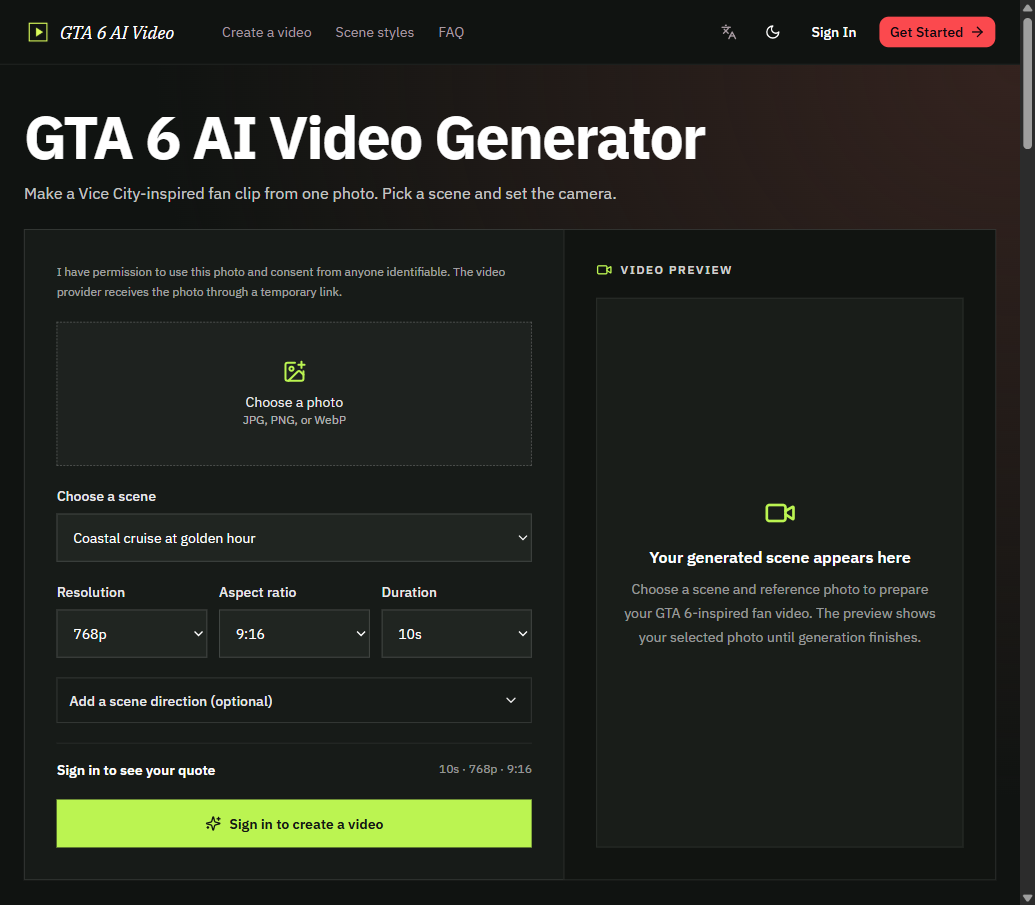
GTA6AIVideo interface screenshot, not a generated video example.
What to compare before choosing a GTA 6 AI video generator
Start with the input. Some tools begin with a written prompt, some place one uploaded photo into a prepared scene, and some let you provide both. If the important part is seeing yourself in a fan-made scene, check whether the tool accepts a photo and whether the preview actually uses it. If the important part is writing a multi-beat story, check whether it supports scene changes, voice, captions, or a separate editing step.
Next, look at how much control you get. A template can reduce setup: choose a version, upload a photo, and let the preset provide the sequence. A prompt box gives you more room to describe action, weather, camera movement, or atmosphere, but it also makes the result depend on how clearly you describe one scene. Neither approach is automatically better. It depends on whether you want a repeatable trend format or a more open-ended idea.
Then inspect evidence. Prefer a working preview, sample clips, or a gallery with enough context to understand what was entered. A single polished hero video may be an edited promotional example. Check whether examples are labeled, whether they show the real product workflow, and whether the service distinguishes user-created work from its own demos. If you are comparing animation quality, use the same source photo and a similar direction in each tool; otherwise you are comparing different creative inputs, not the models.
Finally, compare the payment unit. “Pay as you go” can mean a one-time credit pack, a credit charge for each render, or a wallet that is topped up through recurring billing. Before paying, check whether credits expire, whether one attempt can produce more than one clip, when credits are deducted, and what happens when a task fails. A credit number by itself is not a price comparison.
How the current tool pages differ
Revid: prompt-first videos with a large example gallery
Revid's GTA-specific page starts with an idea prompt and describes a finished short with voice, captions, and music. The page also shows example prompts and groups example videos by types such as trailers, story scenes, and music videos. This is useful when you are still choosing a format, or when you want to inspect how a prompt-led workflow is presented.
It is a broader route than simply animating one photo in a preset environment. If you need an exact face or a particular action, inspect the examples and controls carefully before paying. A site-wide video gallery does not prove that each style can be recreated from one selfie or that it will preserve every detail. View Revid's current GTA 6 video workflow.
Pollo: a prompt composer with a GTA Film mode
Pollo's GTA page presents a text prompt, attachment control, generation-mode control, a GTA Film style option, and examples that can be recreated. This layout is helpful if you want to browse starting points and then adjust a written scene. It also makes the creation flow visible before you sign in, so you can inspect the type of input the page expects.
The page is part of a wider image and video creation product, so do not assume that every feature shown elsewhere in the product is included in this particular GTA workflow. Check the selected mode, output settings, usage charge, and payment renewal terms in the live interface. View Pollo's current GTA video page.
CopyThatVideo: a short, template-led selfie flow
CopyThatVideo's page puts the steps in the generator itself: choose a GTA template, add a photo, optionally enter details, select a quality option, and review the credit amount on the action button. That is a clear interaction pattern for a creator who already knows which template they want.
The trade-off is that a template-driven flow gives you a narrower creative starting point than a general video editor. Check the preview, output settings, and current cash price before starting. Its displayed credits are not directly comparable with another service's credits unless you know the price and output allowance for each. View CopyThatVideo's current GTA generator.
GTA6AIVideo: photo input with scene selection
Our generator accepts one reference photo, offers original coastal-city scene presets, and allows optional camera direction. After sign-in, the studio shows the current credit quote and balance before you submit. This suits a creator who wants to start from a photo and choose a scene rather than build a complete narrated script.
There are two important limitations to know before choosing it. First, generation requires an account; the site does not promise anonymous generation. Second, on November 21, 2026, the live pricing page said credit purchases were unavailable. GTA6AIVideo uses one-time credit packs, not recurring subscriptions, but checkout availability can change. Check the pricing page for the current state, and read the photo-to-video guide for the workflow.
Which tool is best for realistic GTA-style motion?
Do not choose from a label such as “cinematic,” “realistic,” or “game-quality” alone. AI video can change faces, hands, clothing, vehicles, signs, and small background details between frames. A sample made with a different photo, prompt, model, or edit is not a reliable prediction of your own output.
For a practical comparison, use a photo you have permission to upload and write one short direction that describes a single action, camera movement, and atmosphere. Keep the source and direction as similar as each tool allows. Review the full clip, not only a thumbnail: look for identity consistency, coherent motion, unwanted cuts, and details that change. Save the source settings and compare the total payment required for a usable result, not just the first attempt.
Until we publish our own reviewed samples, we will not label GTA6AIVideo's output as the most realistic or rank it above services with public examples. The official Grand Theft Auto VI page is the source for official game information; these AI tools create unofficial fan-made material and are not Rockstar products.
How to compare one-time payment and subscriptions
No-subscription does not always mean one payment per finished video. GTA6AIVideo uses one-time credit packs: a pack adds credits to an account, and a generation uses the amount shown in the studio. A pack can cover multiple attempts or only part of a longer workflow depending on its size and the live generation quote. It is not an unlimited-use promise.
On November 21, 2026, the live GTA6AIVideo pricing page displayed that credit purchases were unavailable. The one-time credit-pack model was not open for checkout on the review date. We do not list a price or imply that a visitor can purchase credits now. When a pack is available, review its cash price, included credits, expiration, payment provider, and refund terms before confirming. Also check whether another site offers single-render checkout, a prepaid wallet, or a recurring plan; similar words can describe different billing arrangements.
A quick selection checklist
- Write down the intended input: one photo, several photos, or a text prompt.
- Decide whether you want a ready-made trend or more control over the scene.
- Watch a full example and note whether it was made from the same type of input you plan to use.
- Confirm the clip format, length, resolution, download option, and any editing work required after generation.
- Convert credits into a cash cost using the current checkout, and verify renewal, expiration, and failed-task rules.
- Read the photo-retention and content rules before uploading another person's likeness.
For a step-by-step photo workflow, continue to How to Make a GTA 6 AI Video From a Photo. To create with our scene-based tool, return to the GTA 6 AI video studio after checking current purchase availability.
Common questions
Can I make a GTA 6 AI video from my own photo?
Several tools offer a photo input, but the exact flow varies. GTA6AIVideo accepts one reference photo after sign-in. Use only an image you have permission to upload, and get consent from identifiable people shown in it. The result may alter facial or scene details, so review the clip before sharing.
Is there one best GTA 6 AI video generator?
Not without a defined use case and a controlled output comparison. A template tool may suit a fast, repeatable trend; a prompt-first product may suit a narrated story; a scene-based photo tool may suit a creator who wants to guide a single shot. Compare the workflow and evidence, then test results with similar inputs.
Do I need a subscription to use GTA6AIVideo?
The product uses one-time credit packs rather than recurring subscriptions. On November 21, 2026, the pricing page showed that credit purchases were unavailable. Check that page for the live status. The current credit quote is shown in the studio before generation is submitted.
Is this an official Rockstar Games generator?
No. GTA6AIVideo is an independent fan creation tool. It is not affiliated with, endorsed by, or operated by Rockstar Games or Take-Two Interactive. Generated scenes are not official gameplay or trailers.
Sources and review method
Product features in this guide were checked on November 21, 2026 against the publicly accessible pages for Revid, Pollo AI, and CopyThatVideo. Interface labels, example counts, credit amounts, and availability can change. This is not a same-prompt performance test, and those public pages are the source for each platform's current feature and payment terms.